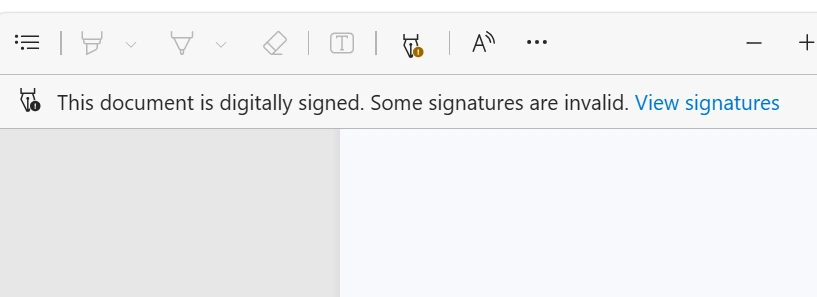
What does "Some signatures are invalid" mean in Adobe Acrobat?
When you open a digitally signed PDF in Adobe Acrobat Reader or Acrobat Pro, the software automatically performs an in-depth cryptographic verification of all signatures, timestamps, and digital certificates embedded in the file.
If Adobe encounters a multi-party document or a file containing multiple signature objects where at least one fails cryptographic or trust validation, the top notification bar displays the warning:
"This document is digitally signed. Some signatures are invalid."
Accompanied by a yellow warning sign or red cross, this message immediately alarms recipients—whether clients, commercial bankers, auditors, or external legal counsel: Is the contract legally binding? Has someone tampered with the text? Is the signer's identity unverified?
The 4 most common causes of invalid signatures
A digital PDF signature is not merely an image of handwriting; it is a mathematical hash encrypted using a cryptographic certificate (PAdES standard). Four primary factors trigger this error:
- 1. Post-signature document alterations (Integrity Violation): If pages were added, removed, compressed, or form fields modified after signing, the PDF hash no longer matches the signature digest.
- 2. Unknown or untrusted Certificate Authority (CA): The certificate was issued by an authority not included in Adobe Approved Trust List (AATL) or EU Trusted Lists (EUTL).
- 3. Missing Long-Term Validation (LTV) and timestamp: If the signature lacks an RFC 3161 timestamp and embedded revocation info (OCSP/CRL), validation fails once certificates expire.
- 4. Flawed multi-signature sequence: If signing software overwrites revisions instead of using incremental saves, earlier signatures are corrupted.
The problem with inadequate signing tools and untrusted CAs
Many companies mistakenly assume that all e-signature software adheres to international security standards. In reality, numerous budget tools generate self-signed certificates or rely on unrecognized private CAs.
Neither Adobe Acrobat nor operating systems like Windows and macOS trust these unknown CAs. The consequence is immediate: every contract you send to clients or financial institutions opens with an alarming invalidity banner.
Even if an agreement might theoretically hold under contract law, the technical burden of proof collapses, prompting banks and counterparty attorneys to reject the document outright.
Step-by-step diagnostic guide in Adobe Acrobat
To diagnose the exact cause of the warning, use Adobe Acrobat's built-in Signature Panel:
- Step 1: Open the "Signatures Panel" in the left-hand sidebar of Adobe Acrobat.
- Step 2: Expand the signature marked with a yellow or red icon.
- Step 3: Right-click the signature and choose "Show Signature Properties".
- Step 4: Inspect the "Validity Summary" to check whether document integrity was breached or certificate trust failed.
- Step 5: Click "Show Signer's Certificate" and review the "Trust" tab.
How to update Adobe's Trust Lists (AATL & EUTL)
In some cases, Adobe Reader simply needs to fetch the latest global trusted root certificates:
Navigate to Edit -> Preferences -> Trust Manager in Adobe Acrobat (Acrobat -> Preferences on macOS). Under "Automatic Trust List Updates", enable "Update from Adobe AATL" and "Update from Adobe EUTL", then click "Update Now".
If the signature remains invalid after updating, the certificate authority is unaccredited or the file has been altered, requiring a fresh signing via a certified platform.
Business risks of sending invalid signatures to clients & banks
Distributing documents with invalid signature warnings undermines commercial credibility, causes immediate rejection of mortgage and credit documentation by banks, and severely compromises legal enforceability in court.
Future-proof solution: Why you should use KvikSign
Eliminating invalid signature warnings is straightforward: upgrade to KvikSign for all company agreements.
KvikSign utilizes accredited Certificate Authorities (including GlobalSign) recognized on the Adobe Approved Trust List (AATL) and EU Trusted Lists.
Integrated MitID & MitID Business authentication provides irrefutable national eID identity verification with CPR/CVR validation.
Full PAdES-LTV sealing with RFC 3161 timestamps guarantees clean validation decades into the future.
Your clients, banks, and auditors will always see the reassuring green banner: "Signed and all signatures are valid".